Tour de Cure 2015

The obvious reason I ride in the American Diabetes Association’s Tour de Cure, as I did the last seven years, is because I was diagnosed with Type 1 diabetes 42 years ago. While I have seen amazing advancements in the treatment of diabetes over these decades, I look forward to further research and improvements. Most of all, I pray for the day that a cure is found.

In this eighth year that I ride in the Tour de Cure, I have more important reasons to ride, as shown in the photo on this page: my wife, Sara, and our twin boys. I would like to see a cure and, until that day, better treatments to ensure that I may share as long a life as possible with them. I want to see these two precious boys grow up, from their first day of school, to teaching them to ride bikes and join me on rides, to teaching them to drive, to teaching them to shave, to seeing their high school and, I hope, college graduation ceremonies. I would like to see how much Paul, whose face is the spitting image of mine from 45 years ago (ignoring his strawberry birthmarks), continues to resemble me as he ages. And I would like to see how much Michael, whose face bears a similar resemblance to Sara’s at his age, also resembles her as he ages.

Sara reading to the boys

I also pray that our boys do not inherit my Type 1 diabetes, and hope that research may prevent its onset or provide a cure should they be susceptible to it.
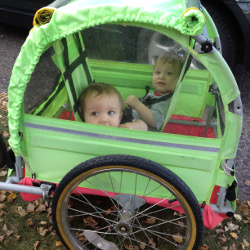
Paul and Michael in the bike trailer

Please support me with a donation by visiting my Tour de Cure page and selecting the “Donate to Me” link. Our efforts will help set the pace in the fight against diabetes. So let’s get in gear and bike to beat diabetes!

Each mile I ride, each dollar I raise will be used in the fight to prevent and cure diabetes and to improve the lives of all people affected by diabetes.

No matter how small or large, your generous gift will help improve the lives of my family and more than 20 million other Americans who suffer from diabetes, in the hope that future generations can live in a world without this disease. Together, we can all make a difference!

Thank you for considering making a generous contribution to this cause that is so important to me.
Time for a Phisher to Step Up Their Game

So, yesterday, I got this stupid email:

Date: Tue, 9 Dec 2014 10:01:34 +0300
To: [me]
From: Walmart <dcumbest@onsite-us.com>
Reply-To: Walmart <dcumbest@onsite-us.com>
Subject: Order Confirmation

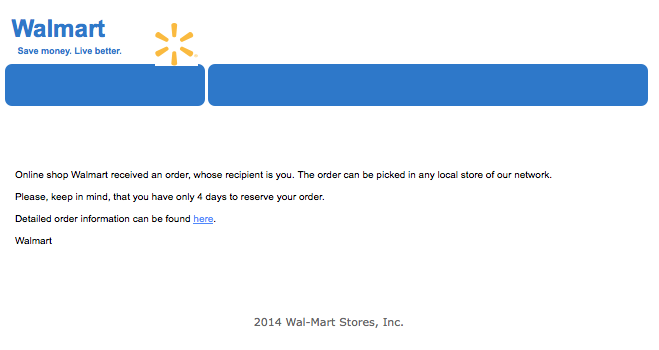
walmart-spam

The text, which is ridiculously small in the HTML presentation shown in the screen capture above, is as follows:

Online shop Walmart received an order, whose recipient is you.
The order can be picked in any local store of our network.

Please, keep in mind, that you have only 4 days to reserve your order.

Detailed order information can be found here.

Walmart

2014 Wal-Mart Stores, Inc.

Now, I know Arkansas (Walmart – or is it Wal-Mart – ‘s home) is not renowned for a high ranking among the states with regard to education. However, I would assume their marketing email would have slightly less stilted English, as well as being consistent in how they spell the corporate name.  Now, given that:

  1. I have never shopped for anything on Walmart’s website – or “online shop Walmart”.
  2. This email from “Walmart” or “Wal-Mart” is from a “dcumbest@onsite-us.com”, even though I think Walmart is big enough to have at least one email domain with a name resembling the company’s name.
  3. I have never known any store to allow you to place an order for in-store pickup without choosing the specific store where delivery will be made, since it is kind of nice actually to have the item in the store’s inventory when you go to pick it up.
  4. Four days seems an awfully short time “to reserve your order”.
  5. The closing “copyright notice” neglects to include a “©” before the year and misspells the corporate name.
  6. There are the odd random acts of using commas.

How likely do you think it is that I am going to click on any link in the email? I wonder if the clueless phisher responsible for this is in some way related to the even more clueless phisher who sends emails from the “US Postal Service” stating that there is a package to pick up at any post office (because, of course, the USPS doesn’t deliver to your address by default, and it doesn’t matter which location you go to obtain the package), and includes “news headlines from the BBC” at the bottom.

Come on, guys. At least spend a little time researching how the organizations you are terribly attempting to spoof work.

Visiting CareLink Site on OS X Mavericks

Here is a tip for people who fall into the same small category as myself. If you

  • use a Medtronic insulin pump,
  • use the CareLink site to store your pump history,
  • use a Mac, and
  • are running OS X Mavericks for a time – short, I hope – after I write this post,

you will run into the problem that I ran into when I first attempted to upload my pump data after upgrading to Mavericks. You will get an error page stating,

Unfortunately, the configuration of your PC or web browser is not compatible with our standard system requirements.

This is because the only OS X versions supported are “MacOSX 10.5 (Intel), MacOSX 10.6/10.7/10.8”. Unfortunately, Mavericks is version 10.9. Unlike the logic for the browser, which recognized that my Firefox 24.0 met the Firefox 5 requirement, the OS check does not appear to allow for future versions.

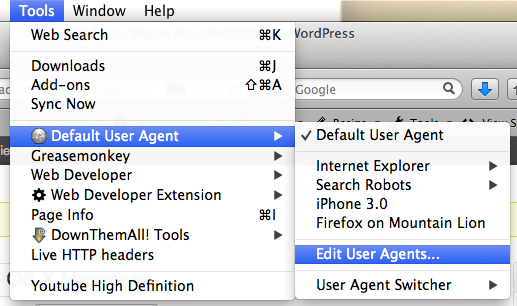
The workaround that I am using, for now, is to use the Firefox User Agent Switcher plugin. After installing the plugin and restarting Firefox, create a new “Firefox on Mountain Lion” user agent as follows:

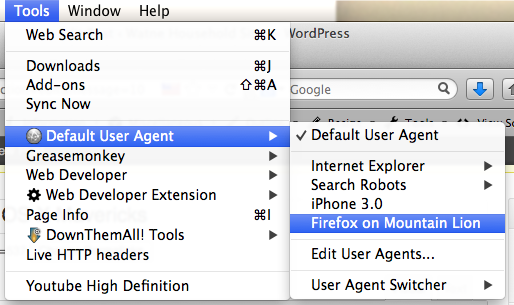
Select Tools / Default User Agent / Edit User Agents…

Tools / Default User Agent / Edit User Agents...

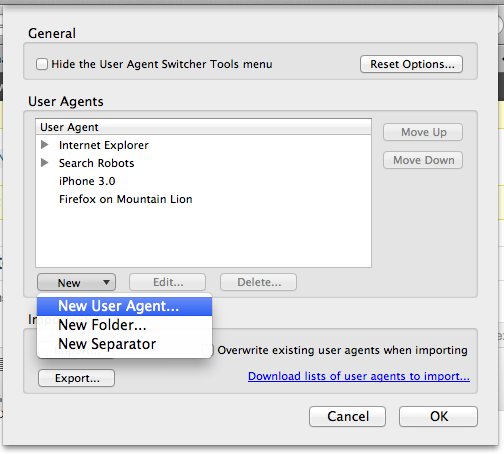
In the “User Agents” section, choose New / New User Agent…

New User Agent...

In the window that appears, you will see “… Intel Mac OS X 10.9;…” in the “User Agent” field.

default user agent values

Change the version from 10.9 to 10.8, and give a helpful description like “Firefox on Mountain Lion” in the “Description” field. Then, before visiting the CareLink site, select Tools / Default User Agent / Firefox on Mountain Lion [or whatever name you gave the user agent]. You will now be able to use the CareLink site!

Tools / Default User Agent / Firefox on Mountain Lion